
The contract is signed, the data is imported, and the team gets a training session. Six months later, reps are back to spreadsheets and sticky notes, and the CRM holds a few hundred half-filled records.
Leadership sees a dashboard that doesn't match reality. Sales sees one more tool that slows them down. Nobody is sure whether the problem is the software, the setup, or the people.
That uncertainty is expensive. It usually ends in a second CRM purchase that repeats the same mistakes on a new platform.
This guide covers what CRM is meant to deliver, what the famous failure rates actually measure, the top reasons companies don't get value from CRM software, and how to fix each one.
| Quick Summary: Why companies fail to get value from CRM software explained | |
|---|---|
| Main cause | People and process problems, rarely the software itself |
| Failure-rate myth | The widely quoted figures trace to a 2001 Gartner survey about unmet expectations, not outright failure |
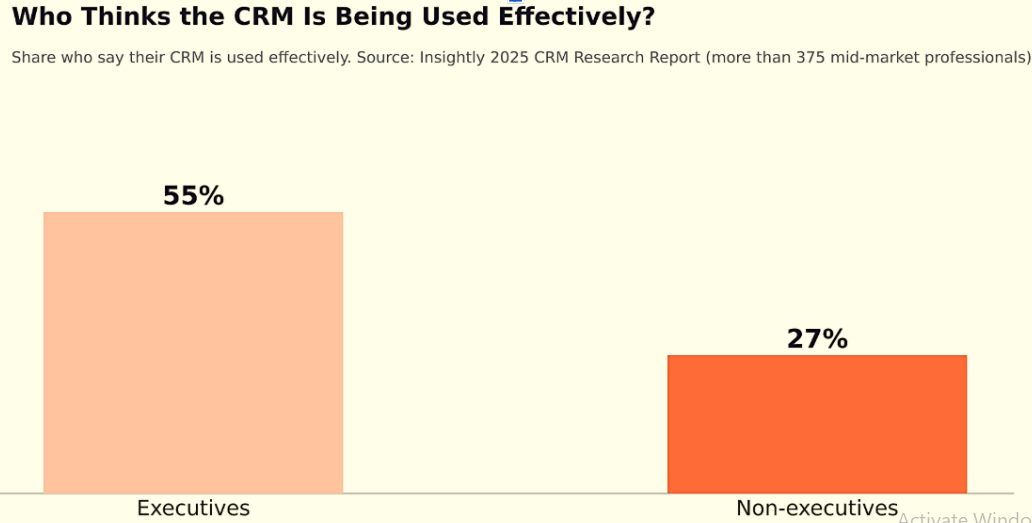
| Perception gap | Insightly's 2025 report found 55% of executives think their CRM is used effectively, vs 27% of non-executives |
| Common reasons | Built for managers, dirty data, big-bang rollouts, no adoption owner, wrong-sized system |
| Fastest fix | Rebuild the daily workflow around the people who enter the data |
| What to measure | Response time, days in stage, and booked revenue, not logins |
| Before switching | Fix process and data first, or the new CRM inherits the same problems |
What Does CRM Mean and Why Companies Invest in It
CRM stands for customer relationship management. CRM software is the system a business uses to store contacts, track every conversation and deal, and manage follow-up from first inquiry to repeat sale.
Companies invest in CRM to improve lead management, stop losing leads between people and inboxes, understand their sales pipeline, and make follow-up consistent without relying on memory.
Getting value means those three things actually happen. A CRM that stores contacts but doesn't change response times, pipeline visibility, or follow-up is just an expensive address book.
Why companies fail to get value from CRM software: What Failure Rate Numbers Actually Say
Most articles on this topic open with a claim that 50% to 70% of CRM projects fail. Those figures are worth checking before planning around them.
In a 2004 interview with Gartner analyst Ed Thompson, he explained that the original figure came from a late-2001 Gartner survey of more than 500 large client organizations, where about 55% said their CRM projects had not met expectations. The press shortened that to “failed.”
By his account, only around 5% of those projects were absolute failures. Most sat somewhere in between: partly successful, but short of what was promised.
| Outcome (late-2001 Gartner survey) | Approximate share | What it means in practice |
|---|---|---|
| Absolute success | About 5% | Delivered everything promised |
| Somewhat successful, short of goals | About 40% | Working, but value left on the table |
| Met expectations in some way | About 40% | Useful, with gaps |
| Somewhat unsuccessful | About 10% | Struggling, but recoverable |
| Absolute failure | About 5% | Abandoned or replaced |
That's the more useful takeaway. Most CRMs don't fail outright; they underdeliver. The value is there, but the setup, data, and habits around the software keep companies from reaching it.
Top Reasons Why Companies Fail to Get Value From CRM Software
The reasons fall into four groups: who the system is built for, the data inside it, how it's rolled out, and whether it fits the business as it grows.
People problems: built for managers, not users
Many CRMs are configured around the reports leadership wants, not the workflow reps live in every day. Every extra required field is a small tax on the people the system depends on.
The gap shows up in how differently each group sees the same system. Insightly's 2025 CRM Research Report, a vendor survey of more than 375 mid-market go-to-market professionals, found 55% of executives believe their CRM is used effectively, compared with 27% of non-executives.
No one owns adoption after go-live
Training is treated as a one-time event. Once the launch is over, nobody checks whether the team is using the system, so old habits quietly return.
Data problems: dirty records in, useless reports out
Duplicate contacts, missing phone numbers, and deals stuck in stages for months make every report unreliable. Once reps stop trusting the data, they stop updating it, and the cycle gets worse.
Data problems often start during CRM migration, when years of spreadsheets are imported without cleanup, and then grow because nothing stops new duplicates from being created.
Rollout and fit problems
Launching every feature at once overwhelms teams, and choosing a system that is too big or too small for the business creates daily friction.
Automating broken processes
Automation copies whatever process it is given. If follow-up was inconsistent before, an automated version just sends inconsistent follow-up faster.
Scalability problems and user sentiment
CRM scalability problems often show up as user frustration before they show up as technical limits. Insightly's 2025 report found 86% of high-adoption teams say their system is the right size, compared with 62% of lower-adoption teams.
| Reason | Warning sign | Fix |
|---|---|---|
| Built for managers | Reps keep notes outside the CRM | Cut required fields to what reps actually use |
| No adoption owner | Usage drops after the first month | Name one owner and review usage monthly |
| Dirty data | Nobody trusts pipeline reports | Clean, dedupe, and set entry rules before adding features |
| Big-bang rollout | Team overwhelmed in week one | Launch one pipeline or team at a time |
| Broken process | Automations send the wrong messages | Map and fix the process before automating it |
| Wrong size | Paying for unused features, or hitting limits | Match the platform to the team's real workflow |
For the people involved, a CRM that isn't working is draining. Managers feel blind, reps feel micromanaged, and both sides start blaming the software for a problem that usually started with the setup.
How to Fix a CRM That Isn't Delivering Value
Most underperforming CRMs can be recovered without switching platforms. The order of the fixes matters:
- Define three outcomes: for example, faster first response through speed-to-lead automation, fewer deals stuck in stages, and more booked calls.
- Interview the daily users: ask reps which fields, screens, and steps slow them down, and remove what nobody uses.
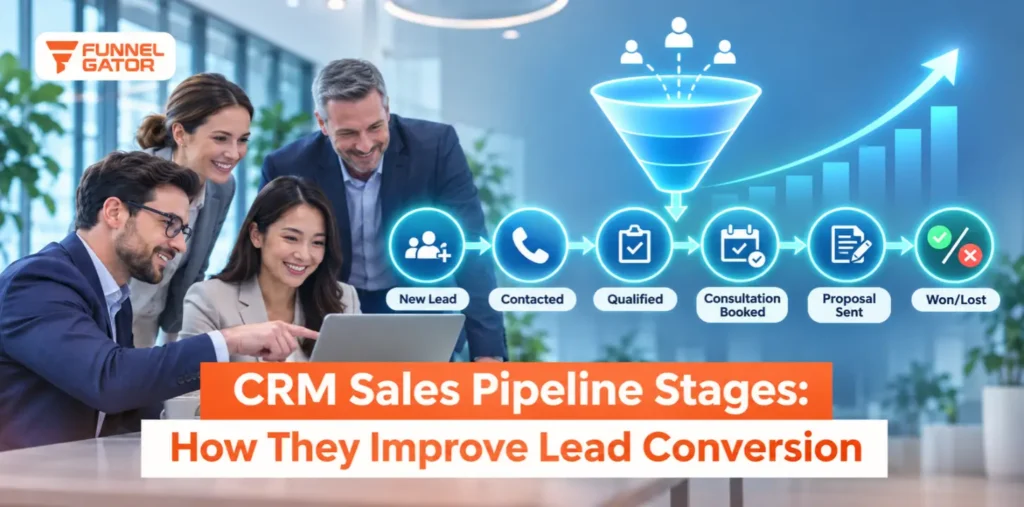
- Clean the data: merge duplicates, close dead deals, and define clear CRM sales pipeline stages.
- Automate the boring parts: let calls, emails, and form submissions log themselves so entry stops being a chore.
- Name an adoption owner: one person reviews usage and data quality every month.
Record a baseline before changing anything: average time to first response, average days a deal sits in each stage, and booked calls per month. Without it, nobody can tell whether the fixes worked or just felt better.
When to Get Outside Help Rebuilding a CRM
Small fixes can be handled in-house. Outside help makes sense when the CRM needs restructuring, several tools need connecting, or nobody on the team has the time or the experience to own it.
Funnel Gator's CRM automation services start with discovery and a CRM blueprint, then rebuild pipelines, follow-up automation, and reporting around how the team actually sells, over a four-week process.
In our experience, the most common finding in a CRM audit isn't a missing feature. It's a pipeline with too many stages, too many required fields, and no one responsible for keeping it clean.
What Getting Value From a CRM Actually Looks Like
Value from CRM software shows up in operating numbers, not in how many features are switched on.
In the Apex Auto Care case study, a restructured GoHighLevel CRM with nine connected pipelines cut speed to lead from four to six hours down to about five minutes. Leads going cold dropped from about 35% to under 5%, and monthly revenue rose by 48%.
The change came from structure and follow-up, not a bigger software plan. Each pipeline had a clear purpose, every stage had a next step, and automations handled the timing reps used to forget.
Choosing the Right CRM Software for a Small Business
Picking the wrong-sized system is one of the reasons CRM fails, so the choice deserves care. Most CRM programs today are cloud-based CRM software, meaning they run in a browser with no servers to manage.
Salesforce is a CRM, and one of the largest, but its depth suits teams with dedicated admins. Small businesses usually get more value from simpler platforms such as HubSpot, Pipedrive, or GoHighLevel, depending on whether they need marketing tools, a pure sales pipeline, or an all-in-one system.
- Fit the daily workflow: reps should be able to log a call and move a deal in seconds.
- Check the integrations: forms, calendars, phone, email, and payments should write to the CRM directly.
- Price the whole team: per-seat pricing grows with headcount; flat pricing adds usage fees.
- Plan for the next two years: choose for the team size the business expects, not just today's.
Before signing, run a real trial: load a sample of actual contacts, have two reps work their normal day in the system for a week, and note every step that feels slower than the current process.
Why Switching CRMs Often Makes It Worse
When a CRM isn't delivering, replacing it feels like progress. But a migration carries the same dirty data, unclear stages, and missing ownership into a new system, along with months of retraining.
Switching makes sense when the current CRM genuinely can't run the needed workflows or integrations. It rarely makes sense as a fix for adoption or data problems.
Final Verdict: The Software Is Rarely the Problem
Companies fail to get value from CRM software when the system is built for reports instead of the people using it, when data goes in dirty, when everything launches at once, and when no one owns adoption after go-live. The widely quoted failure rates overstate the problem; most CRMs just underdeliver rather than collapse. Define a few business outcomes, simplify the daily workflow, clean the data, roll out in phases, and give one-person ownership. Fix those before considering a new platform, because a switch only moves the same problems somewhere new.
Paying for a CRM That Isn't Paying Off? Book a Free Strategy Call
Funnel Gator will audit the current CRM setup and show what's holding back response times, data quality, and pipeline clarity.
- A review of pipelines, required fields, and data quality
- A shortlist of fixes ranked by impact on response time and revenue
- A clear recommendation on whether to rebuild or switch platforms
No payment, no pressure, just a plan.
FAQs
Why do companies fail to get value from CRM software and tools?
Most fail because of setup and adoption problems, such as systems built for managers, dirty data, and big-bang rollouts. The software itself is rarely the main cause.
Why does CRM fail so often?
The commonly quoted failure rates trace back to a 2001 Gartner survey about projects not meeting expectations, not outright failure. Most CRMs underdeliver rather than collapse, which means they can usually be fixed.
What does CRM mean?
CRM stands for customer relationship management, the practice and software used to track contacts, conversations, and deals. CRM software stores that information and manages follow-up in one place.
Is Salesforce a CRM?
Yes, Salesforce is one of the largest cloud-based CRM platforms. Smaller businesses often find simpler CRMs easier to adopt and maintain.
What is the best CRM for small businesses?
The best CRM is the one the team will use every day, with the integrations the business needs and pricing that works as it grows. Fit and adoption matter more than the length of the feature list.
Who This Guide Is For (and Who It Isn't)
This guide fits owners and sales managers at small and mid-sized businesses who already pay for a CRM but feel it isn't changing how leads are handled or how the pipeline looks.
It's less useful for enterprises running large multi-region CRM programs, where governance, integrations, and change management need a dedicated project team.