

A sales manager opens the CRM on Monday and sees 140 open deals. Some are from last week, some from last spring, and nobody can say which ones are real.
Half the deals sit in a stage called “In Progress,” which could mean anything from a first voicemail to a signed contract waiting on a deposit.
When stages don't mean anything specific, the pipeline can't show where leads are getting stuck, and the team can't fix what it can't see.
This guide explains what CRM pipeline stages are, the six stages most service businesses need, how to manage them, how to track deals that move backward, and how to choose a CRM that handles multi-stage pipelines well.
| Quick Summary: CRM Sales Pipeline Stages Explained | |
|---|---|
| Definition | Named steps a deal moves through in a CRM, each with a clear meaning |
| Core stages | New Lead, Contacted, Qualified, Consultation Booked, Proposal Sent, Won or Lost |
| Ideal count | Five to seven active stages for most small and service businesses |
| Why it matters | A 2015 Vantage Point Performance study linked a formal sales process to 18% higher revenue growth |
| Key rule | Every stage needs an exit criterion: what must be true before a deal moves on |
| Regression | Track when deals move backward using stage entry and exit dates |
| Visual check | A board view plus a stage-to-stage conversion report shows where deals stall |
What Are CRM Sales Pipeline Stages?
CRM pipeline stages are the columns a deal moves through on its way from first inquiry to a closed sale. Each stage represents something that has actually happened with the buyer, not an activity the rep did.
That distinction matters. “Email sent” is an activity; “Contacted” means the lead has replied and a conversation is underway. Stages built on buyer progress tell the truth about the pipeline; stages built on rep activity just show who is busy.
Pipeline stages also differ from funnel stages. A funnel describes how a whole audience narrows from awareness to purchase, while pipeline stages track individual deals a sales team is actively working.
Pipeline Stages in a CRM for Service Businesses
Most guides describe stages for software or enterprise sales. Service businesses usually sell through a call, a site visit, or a consultation, so their pipeline looks simpler and moves faster.
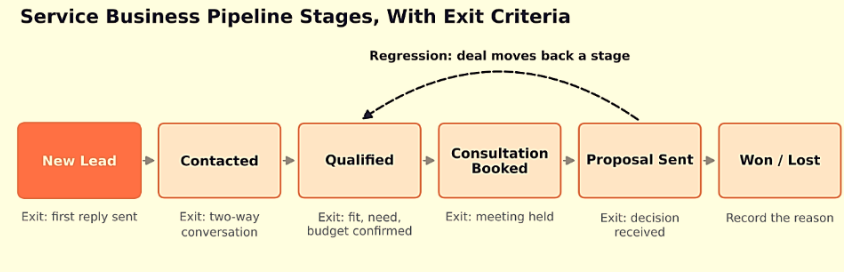
Early stages: New Lead and Contacted
These two stages separate inquiries nobody has answered from conversations that are actually happening.
New Lead
Every form fill, call, or chat lands here automatically. A deal should leave this stage within minutes, once a first reply has gone out. Speed-to-lead automation can help teams respond quickly without relying on manual follow-up.
Contacted
The lead has responded and a two-way conversation is underway. Deals that sit here without a reply for more than a week usually belong in a nurture list, not the active pipeline.
Middle stages: Qualified and Consultation Booked
A qualified deal has a confirmed fit, a real need, and a realistic budget or timeline. Once the lead books a call or site visit, the deal moves to Consultation Booked.
Consultation Booked is where many service pipelines quietly leak, because booked meetings don't always happen.
Late stages: Proposal Sent, Won, and Lost
Proposal Sent covers quotes and proposals waiting on a decision. Won and Lost are outcomes, not stages to work, and every Lost deal should carry a reason.
Why a nurture stage helps
Leads who aren't ready yet shouldn't clutter the active pipeline or be marked Lost. A separate nurture list keeps them warm without distorting conversion numbers.
| Stage | Entry criterion | Exit criterion | Typical max time |
|---|---|---|---|
| New Lead | Inquiry received | First reply sent | Minutes |
| Contacted | Lead replied | Fit and need discussed | About 7 days |
| Qualified | Fit, need, and budget confirmed | Consultation booked | About 7 days |
| Consultation Booked | Meeting on the calendar | Meeting held | Until the meeting date |
| Proposal Sent | Quote or proposal delivered | Decision received | About 14 days |
| Won or Lost | Decision made | Reason recorded | Closed |
The maximum times are starting points, not benchmarks. Each business should replace them with its own averages once a few months of stage data exist.
How Pipeline Stages Improve Lead Conversion
Clear stages change behavior more than any feature does. A 2015 Vantage Point Performance study of 62 B2B companies found that companies with a formal sales process had 18% higher revenue growth than those without one.
The same study found that companies spending at least three hours a month managing their pipeline saw revenue rise 11%.
For a service business, the mechanism is simple. When every lead has a defined status and a next step, fewer inquiries are forgotten, follow-up happens on time, and managers can see which stage loses the most deals and fix it first.
For owners, a clean pipeline also replaces a nagging worry. Instead of wondering whether leads are being handled, they can open one view and see exactly where every deal stands.
Best Practices for Managing Pipeline Stages in a CRM
Managing pipeline stages well comes down to a few habits, and they apply equally to a two-person team or a small business with a dedicated sales staff:
- Keep five to seven active stages: more than that and reps stop updating them accurately.
- Define exit criteria in writing: everyone should know what must be true before a deal moves.
- Name stages after buyer progress: “Consultation Booked” instead of “Called twice.”
- Set a maximum time per stage: deals that sit too long get flagged for review.
- Review the pipeline weekly: close dead deals, update stalled ones, and check stage-to-stage conversion.
- Record why deals are lost: a short dropdown of loss reasons turns lost deals into useful data.
When a Pipeline Needs Rebuilding, Not Just Cleaning
A weekly cleanup fixes stale deals. It doesn't fix stages that never made sense, pipelines that mix different services, or a CRM that nobody trusts enough to update.
Funnel Gator's CRM automation services rebuild pipelines from the sales process up: stage definitions, exit criteria, routing, follow-up, and reporting, delivered through a four-week process from discovery to optimization.
In our experience, the most common fix is removing stages, not adding them. Pipelines with ten or more stages almost always have several that reps skip or ignore.
How to Track Sales Stage Regression in a CRM Pipeline
Stage regression happens when a deal moves backward, such as a proposal that goes back to Qualified because the buyer's budget or scope changed. Occasional regression is normal; frequent regression points to stages that are being advanced too early.
Tracking it requires stage history, not just the current stage. HubSpot's stage calculated properties, available on Professional and Enterprise plans, record the date a deal entered and exited each stage plus its cumulative time there, which makes repeat entries visible.
In any CRM, the same idea works with two custom fields: the date a deal last entered its current stage, and a counter that increases whenever a deal moves backward. A monthly report of deals with a regression count above zero shows which stage is being rushed.
How to Visualize Sales Deals by Stage
Three views cover almost everything a service business needs to see:
- Board view: deals as cards in stage columns, the fastest way to spot crowded or empty stages.
- Stage-to-stage conversion report: the share of deals that move from each stage to the next, which shows where the pipeline leaks.
- Stage aging view: deals sorted by days in their current stage, so stalled deals stand out.
Some CRMs flag stalled deals automatically. Pipedrive's rotting feature, for example, turns a deal red on the pipeline board after a set number of inactive days in a stage, with the period configured per stage.
What a Well-Built Pipeline Looks Like in Practice
The Apex Auto Care case study shows what structured stages can do. Funnel Gator rebuilt the business's GoHighLevel CRM into nine connected pipelines, each with clear stages and automated next steps.
Speed to lead dropped from four to six hours to about five minutes, leads going cold fell from about 35% to under 5%, and the lead-to-job close rate rose from 22% to 34%.
Choosing a CRM for a Multi-Stage Sales Pipeline
Which CRM has the best opportunity stages and pipelines depends less on the brand than on a few specific capabilities. A CRM that handles pipeline stages well should offer:
- Multiple pipelines: separate pipelines for different services or sales types.
- Required fields by stage: the ability to require key details before a deal can advance.
- Stage history: entry and exit dates per stage, so regression and stage time can be measured.
- Stalled-deal alerts: automatic flags when deals sit too long.
- Board and report views: both a visual board and stage conversion reporting.
HubSpot, Pipedrive, Salesforce, and GoHighLevel all support multiple pipelines and custom stages, but they differ in price, reporting depth, and how much setup each needs. For a small business, ease of daily use usually matters more than advanced forecasting.
Businesses choosing GoHighLevel can explore Funnel Gator's GoHighLevel setup services for help configuring custom pipelines and automation.
Pipeline Stage Mistakes That Hurt Conversion
These CRM sales pipeline stages mistake that makes a pipeline look busy while hiding where deals are really lost:
- Too many stages: reps skip steps, and the data stops matching reality.
- Activity-based stages: stages like “Email Sent” track effort, not buyer progress.
- Marking deals Won too early: a verbal yes isn't a signed agreement or a paid deposit.
- Never closing dead deals: old deals inflate the pipeline and distort conversion rates.
Final Verdict: Clear Stages Make Every Lead Visible
CRM sales pipeline stages turn a list of contacts into a clear picture of where every deal stands. For most service businesses, six stages are enough: New Lead, Contacted, Qualified, Consultation Booked, Proposal Sent, and Won or Lost. Give each one a written exit criterion and a maximum time, review the pipeline weekly, track deals that move backward, and record why deals are lost. Do that, and the pipeline stops being a guessing game and starts showing exactly which stage to fix to convert more leads.
Want a Pipeline Your Team Actually Trusts? Book a Free Strategy Call
Funnel Gator will review the current CRM pipeline and show which stages are losing the most deals.
- A stage-by-stage review of the current pipeline and conversion rates
- Clear stage definitions and exit criteria built around the sales process
- A plan for tracking regression, stalled deals, and loss reasons
No payment, no pressure, just a plan.
FAQs
What are CRM sales pipeline stages?
They are the named steps a deal moves through in a CRM, from first inquiry to a closed sale. Common stages include New Lead, Contacted, Qualified, Consultation Booked, Proposal Sent, and Won or Lost.
How many pipeline stages should a CRM have?
Most small and service businesses work best with five to seven active stages. More stages usually lead to skipped steps and inaccurate data.
How do you manage pipeline stages in a CRM?
Define a written exit criterion for each stage, set a maximum time per stage, and review the pipeline weekly. Recording loss reasons turns closed deals into useful data.
How do you track sales stage regression in a CRM?
Use stage entry and exit dates, or a custom counter that increases whenever a deal moves backward. A monthly report of regressed deals shows which stage is being advanced too early.
Which CRM is best for a multi-stage sales pipeline?
The best choice supports multiple pipelines, required fields by stage, stage history, and stalled-deal alerts. HubSpot, Pipedrive, Salesforce, and GoHighLevel all handle custom stages, so fit and ease of use usually decide.
Who This Guide Is For (and Who It Isn't)
This guide fits owners and sales managers at small and mid-sized service businesses setting up a CRM pipeline for the first time, or cleaning up one that no longer reflects how deals actually move.
It's less useful for enterprise sales teams with long, multi-stakeholder cycles, where stages need to reflect procurement, legal review, and complex approval steps.