

Quick Answer: A sales automation CRM uses triggers inside the CRM to handle the repetitive parts of selling: replying to new leads, assigning owners, sending follow-ups, moving deals between stages, and logging activity. Follow-up gets faster because nothing waits on a rep's memory, and the pipeline gets clearer because every deal's stage and next step update automatically.
A lead fills out a form at 4:47 on a Friday. The rep sees it Monday morning, calls once, leaves a voicemail, and the lead drops into a pipeline column nobody reviews until it's two weeks old.
Multiply that by every inquiry in a month and the problem stops being one missed lead. The pipeline report shows deals that are already dead, forecasts are guesswork, and managers can't tell which reps need help.
Most of that delay isn't a people problem. It's a process that depends on someone remembering to do the next step, every time, for every deal.
This guide covers what sales automation in a CRM actually does, the examples that fix slow follow-up, how to set it up, what it costs in 2026, and the parts of selling that should stay human.
| Quick Summary: Sales Automation CRM Explained | |
|---|---|
| What it is | Triggers and workflows inside a CRM that handle repetitive sales tasks automatically |
| Why it matters | Salesforce's 2024 State of Sales report found reps spend 70% of their time on non-selling tasks |
| Biggest win | Instant first response, since a 2011 HBR study tied replies within an hour to about 7x higher qualification |
| Pipeline clarity | Stages, owners, and next steps update on their own instead of waiting on manual entry |
| Typical cost | From about $97 a month flat to $100 per seat a month, depending on the platform |
| Setup time | A focused build typically runs about four weeks from audit to optimization |
| Keep human | Discovery calls, pricing conversations, objections, and anything that needs judgment |
What Is Sales Automation in a CRM?
Sales automation in a CRM is a set of rules that say “when this happens, do that.” A new form fill triggers a text and assigns an owner. A deal moving to Proposal triggers a follow-up three days later if the client hasn't replied. Sales force automation (SFA) is the older term for the same idea, focused on the sales team's own work: contact management, task scheduling, pipeline tracking, and forecasting. In most modern CRMs, SFA is simply the sales side of the platform's automation features. Marketing automation sits earlier in the journey, supporting lead generation through email and ads until contacts are ready to talk to sales, then handing them over. The best results come when both run inside one system, so a lead's history follows it from first click to closed deal.Why Follow-Up Slows Down and Pipelines Get Messy
The time drain is well documented. Salesforce's sixth State of Sales report, a 2024 survey of 5,500 sales professionals in 27 countries, found reps spend 70% of their time on non-selling tasks such as admin work and meeting preparation. The same research found only 35% of sales professionals completely trust the accuracy of their organization's data. When the CRM can't be trusted, reps stop updating it, and the pipeline drifts further from reality. Sales leaders feel this as a constant low-level frustration: a team that works hard every day, and a B2B sales pipeline report that still can't say what's actually going to close this month.Sales CRM Automation Examples That Speed Up Follow-Up
The most useful CRM automation examples are simple. Each one removes a step a rep would otherwise have to remember, at a specific point in the pipeline.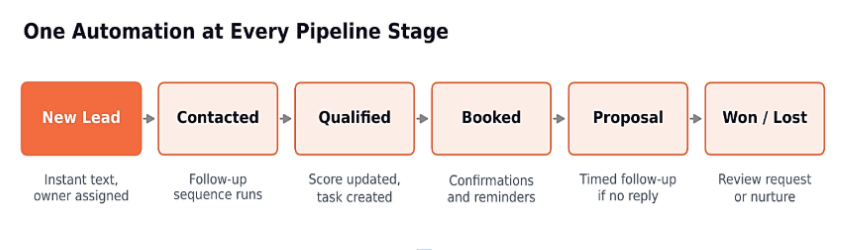
Speed-to-lead automations
Speed-to-lead automation fires the moment a new lead arrives. Response speed matters more than almost anything else in this stage: a 2011 Harvard Business Review study found firms that replied within an hour were about seven times more likely to qualify the lead.Instant reply and owner assignment
A text or email goes out within a minute, while lead management rules assign the lead to a rep by territory or round robin and create a task with a deadline. Missed calls can trigger an automatic text back.Follow-up sequences
If the lead doesn't respond, a timed sequence of texts, emails, and call tasks runs for one to two weeks, then stops the moment the lead replies or books.Pipeline automations
These keep deals moving and the pipeline accurate after first contact.Stage-based tasks and reminders
Moving a deal to a new stage creates the next task automatically, and appointment bookings trigger confirmations and reminders to cut no-shows.Automatic data capture
Calls, emails, form answers, and calendar bookings log to the contact record on their own. This is the automation that answers whether automating CRM entry improves productivity: every minute not spent typing notes goes back to selling, and the data reps stop trusting gets more complete.| Trigger | Automation | What it fixes |
|---|---|---|
| New form fill or missed call | Instant text, owner assigned, call task created | Slow first response |
| No reply after first contact | Two-week text, email, and call-task sequence | Leads abandoned after one attempt |
| Deal moves to Booked | Confirmation plus 24-hour and 1-hour reminders | No-shows |
| Proposal sent, no reply in 3 days | Follow-up email and call task for the owner | Stalled proposals |
| Deal idle 14 days in any stage | Alert to the rep and manager | Dead deals inflating the pipeline |
| Deal marked Won | Review request and onboarding handoff | Lost referrals and messy handoffs |
Key Takeaway: The idle-deal alert does more for pipeline clarity than any dashboard. A pipeline is only as accurate as its oldest untouched deal.
To see whether automation is improving sales team productivity, track four metrics before and after launch: average time to first response, sales activities logged per rep each week, average days a deal spends in each stage, and the share of contact records with complete fields.
Ready for a Pipeline That Follows Up on Its Own? Book a Free Strategy Call
Funnel Gator will review the current CRM and sales process and show where automation will save the most time first.- An audit of response times, stage durations, and stalled deals
- A pipeline and automation blueprint built around how the team sells
- A clear four-week build plan with deliverables listed upfront
 ▸ SCHEDULE FREE STRATEGY CALL
How to Fix a Slow Sales Process With CRM Automation
Sales automation setup works best in a fixed order. Automating a broken process just makes the mistakes happen faster.- Map the current process: write down every stage a deal passes through and who does what at each one.
- Find the delays: look at where deals sit longest, which is usually first response and post-proposal follow-up.
- Clean the data: merge duplicates, close dead deals, and agree on what each stage means.
- Automate one stage at a time: start with speed-to-lead, test it for two weeks, then move down the pipeline.
- Review monthly: check which automations fire, which get ignored, and where deals still stall.
Pro Tip: Before building anything, export the last 90 days of deals and sort by days in stage. The stage with the longest average wait is where the first automation belongs.
When to Bring In a Marketing Automation and CRM Specialist
A small team with one pipeline can often set up basic automations in-house. A marketing automation and CRM specialist earns their cost when there are multiple pipelines, several integrations, or an existing CRM that needs restructuring before anything new is added. Funnel Gator's CRM automation services follow a four-week process: discovery, a CRM blueprint, system setup, and optimization, with pipelines, routing, follow-up sequences, and reporting built around how the team actually sells. In our experience, the builds that hold up are the ones where the sales team helped map the process first. One recent project rebuilt an auto service business's operation into nine automated pipelines, from first inquiry to final review. One limitation worth stating: there's no reliable industry-wide benchmark for how much CRM automation lifts close rates. The honest measure is a team's own before-and-after numbers on response time, stage duration, and booked calls.CRM and Marketing Automation Integration
CRM integration and automation matter because most sales delays happen at handoffs: a form tool that doesn't talk to the CRM, a calendar that doesn't update the deal, or a marketing list that never reaches a rep. Most marketing automation CRM tools now include both sides in one platform, or connect through native integrations. The checklist is the same either way: forms, calendars, phone and SMS, payments, and ad platforms should all write directly to the contact record. When integration is done well, a rep opens a contact and sees the ad they clicked, the emails they opened, and every conversation since, without switching tabs.Sales Automation CRM Cost in 2026: Quick Overview
Sales CRM automation software is priced two ways: per seat, where cost grows with the team, or flat, where usage fees for texts and calls are added on top. The table compares list prices for the first tier that includes follow-up automation, for a five-person team billed monthly.| Platform | Tier with automation | List price | 5-rep team per month | One-time fees |
|---|---|---|---|---|
| HubSpot Sales Hub | Professional | $100 per seat ($90 billed annually) | $500 | $1,500 onboarding |
| Pipedrive | Growth | $49 per seat ($39 billed annually) | $245 | None in reported pricing |
| GoHighLevel | Starter | $97 flat, unlimited users | $97 plus SMS and call usage | None in reported pricing |
What Not to Automate and the Risk of Over-Automation
Automation should handle timing and admin, not judgment. Discovery calls, pricing negotiations, objection handling, and anything involving an unhappy client need a person. Over-automation shows up quickly: duplicate messages when two workflows overlap, follow-ups that keep firing after a lead has booked, and generic texts that make a business sound like a call center. Automated texts and calls also carry legal requirements. Under the TCPA, automated marketing messages need the right prior consent, so consent capture should be built into the forms that feed the CRM.⚠ Warning: Every sequence needs a stop condition. A follow-up that keeps sending after a lead replies, books, or opts out damages the relationship and can create compliance exposure.