

Quick Answer: The main CRM automation benefits are faster first responses, follow-up that never depends on memory, cleaner data, and a pipeline that shows what is actually happening. Together they stop leads from going cold, because every inquiry gets a reply and a next step even when the team is busy.
Most leads don't go cold because they lost interest. They go cold because nobody replied fast enough, the second follow-up never happened, or the inquiry sat in an inbox nobody owned.
By the time someone notices, the person has booked with a competitor who answered first, and the lead stays in the CRM as one more name that never converted.
A CRM on its own records that loss. A CRM with automation prevents it, by handling the timing work people forget when the day gets busy.
This guide covers the benefits that matter most, which processes to automate first, how to judge ROI on an existing CRM, and when outsourcing or a platform switch makes sense.
| Quick Summary: CRM Automation Benefits Explained | |
|---|---|
| Faster response | Instant replies to new inquiries, day or night |
| Consistent follow-up | Sequences run until a lead replies, books, or opts out |
| Cleaner data | Validity's 2025 research found 76% of users say less than half their CRM data is accurate |
| More selling time | Salesforce's 2024 State of Sales report found reps spend 70% of their time on non-selling tasks |
| Clearer pipeline | Stages and next steps update without manual entry |
| Automate first | Lead response, owner assignment, follow-up, and reminders |
| ROI test | Compare recovered deals and saved hours against software and setup costs |
What Are the Benefits of Automated CRM?
The benefits of CRM automation show up in two places: how fast and consistently leads are handled, and how much a team can trust what the CRM is telling them.| Benefit | What changes | How to measure it |
|---|---|---|
| Faster first response | Every new inquiry gets a reply in minutes | Average time to first contact |
| Consistent follow-up | No lead depends on a rep remembering a callback | Touches per lead before close or loss |
| Cleaner data | Calls, emails, and forms log themselves | Share of records with complete fields |
| More selling time | Admin tasks run in the background | Selling activities per rep per week |
| Clearer pipeline | Idle deals get flagged instead of hidden | Average days in each stage |
| Better handoffs | Marketing, sales, and service see the same record | Leads lost between teams |
Why Leads Go Cold Without CRM Automation
Speed is the first thing that slips. A 2011 Harvard Business Review study found firms that replied to leads within an hour were about seven times more likely to qualify them than firms that waited longer. The second is follow-up depth. A rep juggling calls, quotes, and admin makes one or two attempts, then moves on, while the lead was simply busy that week. The cost of that first-hour gap, and the response-time targets that fix it, are covered in Funnel Gator's guide to speed-to-lead response times. Automation is what makes those targets possible outside office hours. For owners, cold leads are one of the more frustrating ways to lose money, because the marketing worked. Someone raised their hand, and the business just didn't answer in time.CRM Processes That Benefit Most From Automation
Not every process is worth automating at the same time. The best order starts with the steps that touch every lead and need the least setup.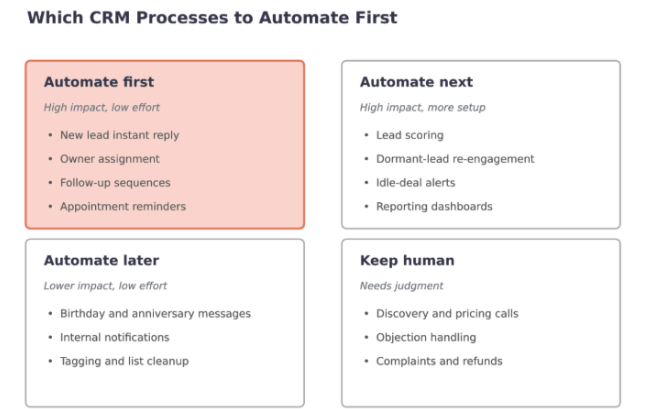
Automate first: the steps every lead passes through
These deliver the fastest return because they apply to every new inquiry from day one.Instant reply and owner assignment
A text or email goes out within a minute of a form fill or missed call, while lead management rules assign the inquiry to a specific rep with a deadline.Follow-up sequences and reminders
A timed series of texts, emails, and call tasks runs until the lead responds, and booked appointments trigger confirmations and reminders.Automate next: the steps that need clean data
Lead scoring, dormant-lead re-engagement, idle-deal alerts, and reporting all depend on accurate records, so they work best once the first-stage automations have cleaned up the data coming in.Dormant-lead re-engagement
Leads that went quiet months ago can be re-contacted automatically with a short, specific message, which recovers some of the inquiries that went cold before automation existed.Where automation should hand off to a person
Once a lead replies, the conversation belongs with a rep. Discovery calls, pricing, objections, and complaints need judgment; automation can schedule and log them, but a person should handle them.Pro Tip: Launch one automation at a time and run it for two weeks before adding the next. When several go live together, it's impossible to tell which one changed the numbers.
Benefits of Automating Data Entry in CRM
Manual data entry is where CRM trust breaks down. In Validity's State of CRM Data Management in 2025 report, a survey of 602 CRM users found that 76% said less than half of their organization's CRM data is accurate and complete, and 37% reported losing revenue because of poor data quality. Automating entry fixes the cause rather than the symptom. When calls, emails, form answers, and bookings log themselves, records stay complete without asking reps to type notes after every conversation. Cleaner data then makes every other automation more reliable. A follow-up sequence can only reach a lead whose phone number and status are correct. It also changes how managers coach. When activity logs itself, a manager can see which reps follow up consistently and which deals stalled, instead of relying on what reps remember to report in the weekly meeting.Ready to Stop Losing Leads to Slow Follow-Up? Book a Free Strategy Call
Funnel Gator will review the current CRM and show which automations would recover the most leads first.- An audit of response times, follow-up gaps, and data quality
- A prioritized list of automations to build first
- A four-week build plan with clear deliverables
 ▸ SCHEDULE FREE STRATEGY CALL
Is Automation Worth Adding to an Existing CRM? Benefits and ROI
For most businesses already paying for a CRM, adding automation is cheaper than switching platforms, because the contacts, history, and team habits are already in place. The most quoted ROI figure comes from a 2014 Nucleus Research report: CRM pays back $8.71 for every dollar spent, based on the firm's own CRM case studies. It's dated, and the summary doesn't say how many deployments it covers, so it works as a signal rather than a forecast. A more useful test uses the business's own numbers. Add the value of deals recovered from leads that would have gone cold to the value of hours saved on admin, then compare that total with software, setup, and maintenance costs over 12 months. As a hypothetical example: recovering four $2,000 deals a year that would otherwise have gone cold, plus five admin hours saved each week at $25 an hour, adds up to about $14,500 in a year. Against a $3,000 setup and $100 a month in software, that is a clear return. Against a $20,000 build for the same team, it isn't, which is why the scope should match the size of the problem.Key Takeaway: If a CRM already holds the contacts and the team already uses it, automation is usually the cheapest way to get more from it. A platform switch only makes sense when the current CRM can't run the automations at all.
CRM and Marketing Automation Support: Benefits of Outsourcing
Outsourced CRM services make sense when nobody on the team owns the system. The benefits are speed, since a specialist has built the same automations many times, and continuity, since the system keeps working when an internal admin leaves. Outsourced marketing automation support also covers the ongoing work most teams skip: checking which workflows fire, fixing broken integrations, and updating sequences as offers change. Keeping the work in-house makes more sense when someone on the team already understands the CRM well, has a few hours a week to maintain it, and the business runs a single simple pipeline. Funnel Gator's outsourced CRM automation services run as a four-week build, covering discovery, a CRM blueprint, setup, and optimization, with pipelines, follow-up, and reporting built around how the team already works. One training client, ABAC Training, said sales had “probably tripled in the last 3 months” after working with Funnel Gator. In our experience, results like that come from fixing follow-up gaps first, not from adding more features.Why Migrate to HubSpot? CRM and Marketing Automation Benefits vs Trade-Offs
HubSpot is a common migration target because it keeps CRM, email marketing, forms, and reporting in one platform, which removes many of the integrations that break between separate tools. The trade-offs are cost and effort. According to HubSpot's own pricing page, updated September 2026, Sales Hub Professional runs $100 per seat per month on monthly billing, with a one-time $1,500 onboarding fee, and its Starter tier doesn't include email sequences. CRM migration services help businesses move contacts, deal history, and existing automations between platforms, while reducing disruption during team retraining. It's worth it when the current CRM can't do what the business needs, and usually not worth it just to get features the current system already has. Three questions settle most migration decisions: can the current CRM run the needed automations, will per-seat pricing still work as the team grows, and who will rebuild and test every workflow during the move.Risks That Can Erase the CRM Automation Benefits
CRM automation can create problems as fast as it solves them when it's set up carelessly.- Automating bad data: a sequence sent to wrong numbers or outdated statuses annoys people and wastes sends.
- Overlapping workflows: two automations firing on the same trigger send duplicate messages.
- Low team adoption: reps who don't trust the system work around it, and the data degrades again.
- Consent gaps: automated marketing texts and calls need the right prior consent under the TCPA.
⚠ Warning: Clean the contact list before switching on any outbound automation. Automating messages to a messy list multiplies every existing error and can get a sending number flagged.